























Thinkware iVolt | PRO EXTERNAL BATTERY(BAB-95)
Specifications
- Output voltage/current : 11.0 V – 14.2 V/2 A MAX
- Charging voltage/current :
- LOW (normal-speed charge mode): 14.2 V/4.5 A Max
- HIGH (high-speed charge mode): 14.2 V/8.5 A Max
- Charging time :
- LOW (normal-speed charge mode): Approximately 90 minutes
- HIGH (high-speed charge mode): Approximately 50 minutes
- Use time : Approximately 27 hours (based on a dash cam’s 3.5 Wh power consumption rate)
- Cells : Lithium iron phosphate (LiFePo4)
- Product capacity : 12.8 V/7,500 mAh/96 Wh
- Dimensions/weight : 155 (W) X 216 (L) X 34 (T) mm/Approximately 1.5kg
- Operating temperature: Charging: 0 – 45 °C Discharging: -10 – 60 °C
(Supplied, inc VAT)
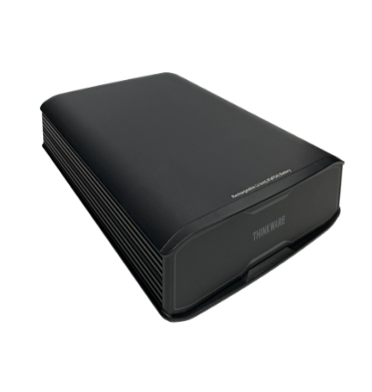
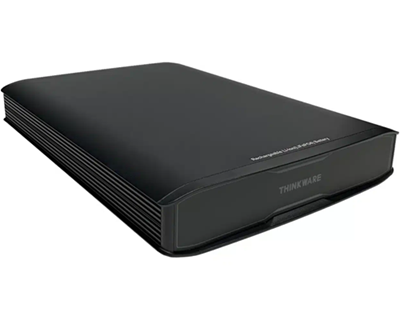
Thinkware iVolt PRO External Battery
- Increase the duration of the Parking Surveillance mode of your Thinkware Dash Cam with the iVolt PRO External Battery.
- With its 8.5 A high-speed charging, the external battery is capable of operating a dash cam for up to 25 hours on approximately 50-minute charge. Max recording time will vary by the Thinkware Dash Cam in use.
- Supports parallel installation of two external batteries to expand battery capacity.
- Compatible with all Thinkware Dash Cam models.
Do I need to use a Dash Cam Battery Pack?
Thinkware Dash Cams offer a few different methods in which the device is powered.
All Thinkware Dash Cams come standard with a built-in voltmeter and battery protection settings to ensure you will not return to your vehicle with a dead battery. These Voltage Settings can be utilized with the Hardwiring Kit or OBD-II Harness to protect your battery when using Parking Mode.
However, If you wish to record an extended amount of Parking Footage, or if you have a Luxury Vehicle/Small Vehicle Battery the Thinkware iVolt PRO Battery Pack may be the right choice for you.
The Benefits of using a Dash Cam Battery Pack
Extended Parking Mode
When Hardwired the Dash Cam will record in Parking Mode for up to approximately 8 hours (depending on vehicle’s battery and the voltage cut-off setting) before powering down to save power. With the iVolt PRO, your 1 Channel Dash Cam can run for up to 30 hours, or if you have a 2 Channel Dash Cam, up to 25 hours in Parking Mode before needing to recharge the battery pack.
Safe for Luxury Vehicles
If you own a Luxury Vehicle such as a BMW, battery drainage not only means replacing the vehicle’s battery but it can also require the dealership to reset the vehicle’s electronics, which can turn into an extremely expensive fix.
By using a Dash Cam Battery Pack, you will still be able to use our Advanced Parking Mode risk-free.
Avoid Wear and Tear
With a Hardwired Dash Cam, the constant discharge on the battery over a long period of time can cause wear and tear. The iVolt PRO Battery Pack only draws power to charge when you are driving the vehicle, which prevents damage to the vehicle’s battery over time. With the ignition off, the Dash Cam relies solely on the Battery Pack for power, eliminating the need to draw power from the vehicle’s battery completely.
Why use a Dash Cam Battery Pack instead of a Portable USB Battery Pack?
Portable USB Battery Packs feature different technology than a dedicated Dash Cam Battery Pack. Portable USB Battery Packs typically use Lithium-Ion batteries to provide power to the device. Our Thinkware iVolt PRO utilizes a LiFePo4 (Lithium iron phosphate) battery.
The LiFePo4 battery is safer for in-vehicle use as it was designed to withhold extreme temperatures. Lithium-Ion Batteries used in these Portable USB Battery Packs have been known to combust under extreme heat.
In addition, Portable USB Batteries typically have a long charging time (overnight) compared to our Thinkware iVolt PRO which fully recharges in 45 mins while driving.
Companion App
Accompanying iVolt PRO is its app, which allows you to check the battery’s status, performance, and temperature.The battery features built-in Bluetooth for easy pairing with your smartphone.
Download the app from the Play Store or App Store and follow the instructions on the screen to connect to the battery.


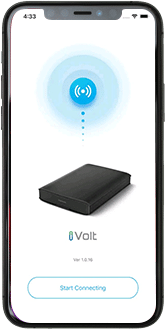
Battery Monitoring
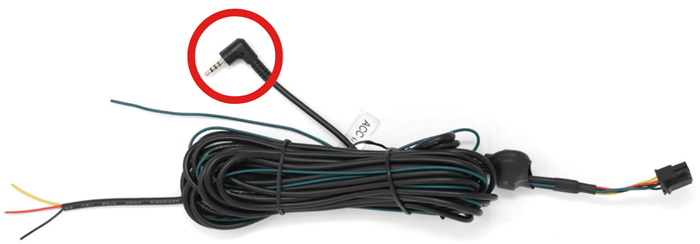
With the Communication Cable
Connecting to a compatible dash cam will allow the battery to communicate with the dash cam. When connected to the battery, the dash cam will announce important information such as battery charge level and status, and unlock the ‘External Battery Saving’ setting. This feature allows the dash cam to automatically switch to Energy Saving mode and conserve power if the battery level falls below 20%.
Compatible with:
U3000 PRO, U3000, U1000 PLUS and Q1000 Dash Cams
Dashcams are not typically included as standard features in vehicles. They are separate accessories that you can add to your car to enjoy the benefits of video recording while driving.
While dashcams draw a small amount of power, they are unlikely to significantly impact your vehicle's battery life. However, it's a good idea to use parking mode with caution.
Dashcams complement safe driving practices by providing evidence in the event of incidents. They are a valuable addition to your safety and security toolkit, enhancing your confidence on the road.
Regular maintenance includes keep formatting SD cards at regular intervals for optimum performance, lens clean, ensuring the power source is stable, and periodically updating the dashcam's firmware for performance improvements.
Dashcams are generally legal to use for personal use, but their use may be subject to data protection regulations. Our experts can provide guidance on legal and ethical usage.
Many dashcams feature a parking mode that monitors your vehicle even when it's parked. It can capture incidents such as accidents, break-ins, or vandalism, providing valuable evidence.
Yes, you can install multiple dashcams for full coverage. Some systems offer front and rear cameras, while others allow for additional side or interior cameras for a complete recording solution.
Dashcam footage is typically stored on an SD card or can be transferred to a computer or smartphone for viewing. It's advisable to back up important footage to a computer or cloud storage.
Do dashcams work at night or in low-light conditions, and do they require special features for this?
The dashcams we offer are equipped with night vision or low-light recording capabilities, ensuring clear video footage even in challenging lighting conditions.
You can't explain that! Just kidding. Dash cams record video to a removable memory card inside the camera itself. Any time your car is on and the dash cam is plugged in, it is acting as your backup witness. Dash cams automatically start recording when they are powered on, and stop recording once you turn your car off. Note: Some dash cam models have the ability to keep recording even while the vehicle is parked! This is known as "parking mode".
Once you have purchased a dash, in most cases this is all you need to do to be up and running:
- Insert a memory card.
- Attach the suction-cup mount to your windshield.
- Plug the power cord into the power source (cigarette lighter or other).
Done! Since recording is automatic, just drive your vehicle like you normally would, and enjoy the fact that you are now "protected by dashcam"!.
Please note that the above is applicable to plug & play dash cams.
Read moreDash cams, or dashboard video cameras, got their name due to originally being mounted on the dashboard of vehicles (mostly police cars). Now, most dash cams mount to a car's windshield with a secure and easy to use suction cup mount or strong adhesive pad.
While many of our dashcams can be easily self-installed, some vehicles, especially those with specific features like split tailgates or complex wiring, may require professional assistance. Our expert installers can handle these challenges, ensuring optimal placement and functionality of your dashcam.
: Absolutely! Our dashcams allow you to access and download recorded footage remotely through a user-friendly online platform or mobile app. For added convenience, some models also support SD card storage, providing an offline option to review your recordings.
If your dash cam is plug & play you can install it your self or you may call our experts to install it in your vehicle however if your dash cam is hardwired then it is adviseable to have our competent engineers install it in your vehicle.